
Disclosure: This review is published by Viking IPTV, which sells its own IPTV service. Viking IPTV and YourFlix IPTV share common ownership. It is based on YourFlix IPTV’s website pages checked on October 10, 2026 and does not include streaming tests.
This YourFlix IPTV review covers what the site promises, not how the service performs. It lists four plans, from $14.95 for 1 month to $59.95 for 12 months, and claims 25,000+ live channels.
You want to know what you’re paying for before game day, not after kickoff. Below you’ll find the claims, the gaps and the questions to ask first. A side-by-side with Viking IPTV is included too.
What is YourFlix IPTV?
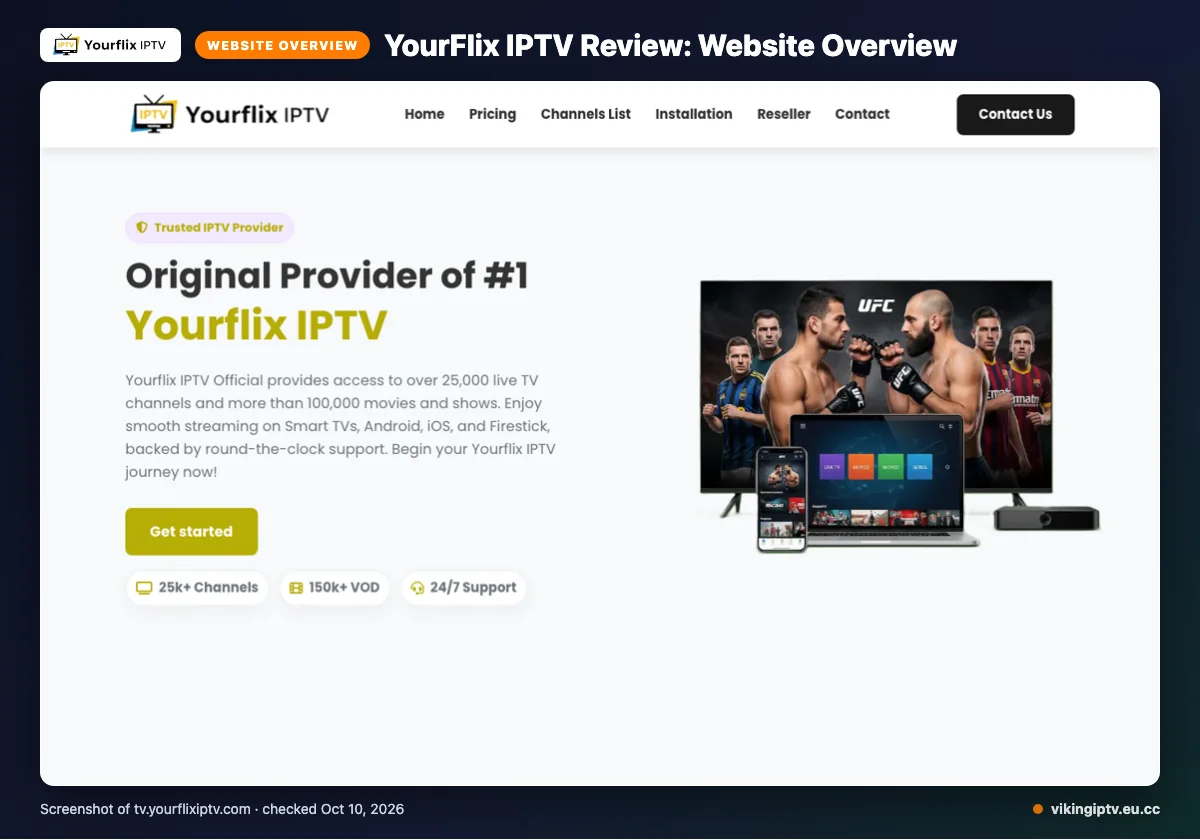
YourFlix IPTV is an IPTV subscription service. You pay for access to live TV and on-demand titles over the internet. Its official site is tv.yourflixiptv.com.
The site names the USA, UK, Canada, Europe, Asia and MENA. Regional plans are mentioned for the USA, Canada, Europe and MENA. The channel list also names France, Turkey, Greece, Belgium, the Netherlands, Germany, India, Latin America and Arabic.
We checked these facts on the site on 2026-10-10. This is a website-based review, so we did not run a streaming test.
Quick tip: Write down what you need (a sport, a language, a device) before reading any provider’s page, so you can check it off as you go.
What does YourFlix IPTV offer?
On paper, it offers a large live and on-demand library, several quality labels and a long device list. Here is what the site says, and nothing more.
- Library: 25,000+ live TV channels and over 100,000 VOD titles. The numbers wobble, though. One graphic shows 150k+ VOD, and a channel-page title says 10,000+ live channels.
- Quality labels: 4K, HD, Full HD, FHD, 4K Ultra HD and Ultra-HD.
- Devices: Smart TVs, Android, iOS, Firestick, Android boxes, MAG devices, MAG Box and PC.
- Apps: IPTV Smarters is the only one named. Others are not listed on its website, which does not mean they are unsupported.
- Guide: the EPG is called user-friendly. Catch-up is not listed. Our EPG explainer shows what to look for.
The site also claims anti-freeze technology, a global CDN, predictive content prefetch, instant channel switching and “Server Stability 99%”. These are its claims, and we did not test them.
Sports channels and PPV are not listed on its website. For game day or fight night, that gap matters.
YourFlix IPTV plans and prices
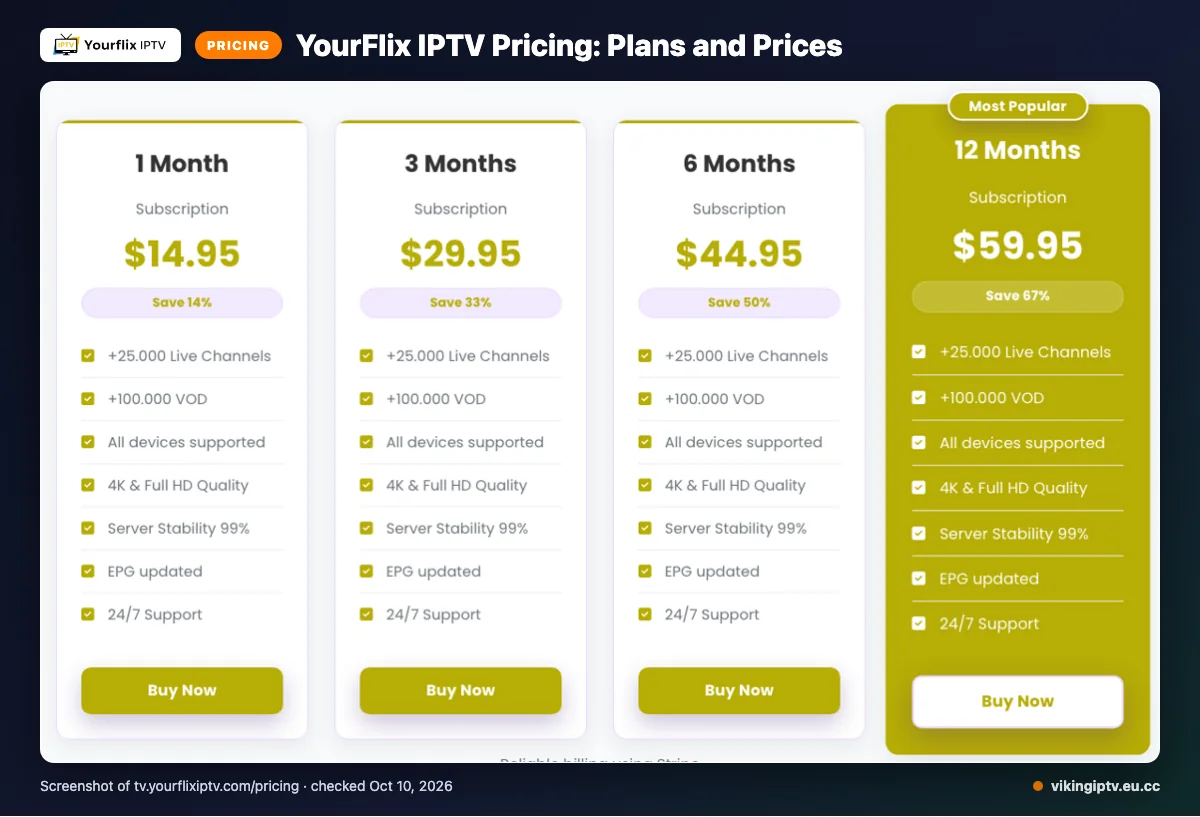
YourFlix IPTV lists four plans, from 1 month to 12 months. Here is what the site showed on 2026-10-10.
| Plan | Duration | Price | Connections |
|---|---|---|---|
| 1 Month Subscription | 1 Month | $14.95 | 1 active connection per account |
| 3 Months Subscription | 3 Months | $29.95 | 1 active connection per account |
| 6 Months Subscription | 6 Months | $44.95 | 1 active connection per account |
| 12 Months Subscription | 12 Months | $59.95 | 1 active connection per account |
The prices use a dollar sign, but the site does not name the currency. Extra connections can be bought, though we did not find their price on its website.
Automatic subscription renewal is listed, so check the renewal setting before you pay.
Quick tip: Note the renewal date in your phone calendar the day you subscribe.
Free trial, refunds and payment at YourFlix IPTV
We did not find a free trial on the pages we checked. So you would pay before you see anything on your own screen.
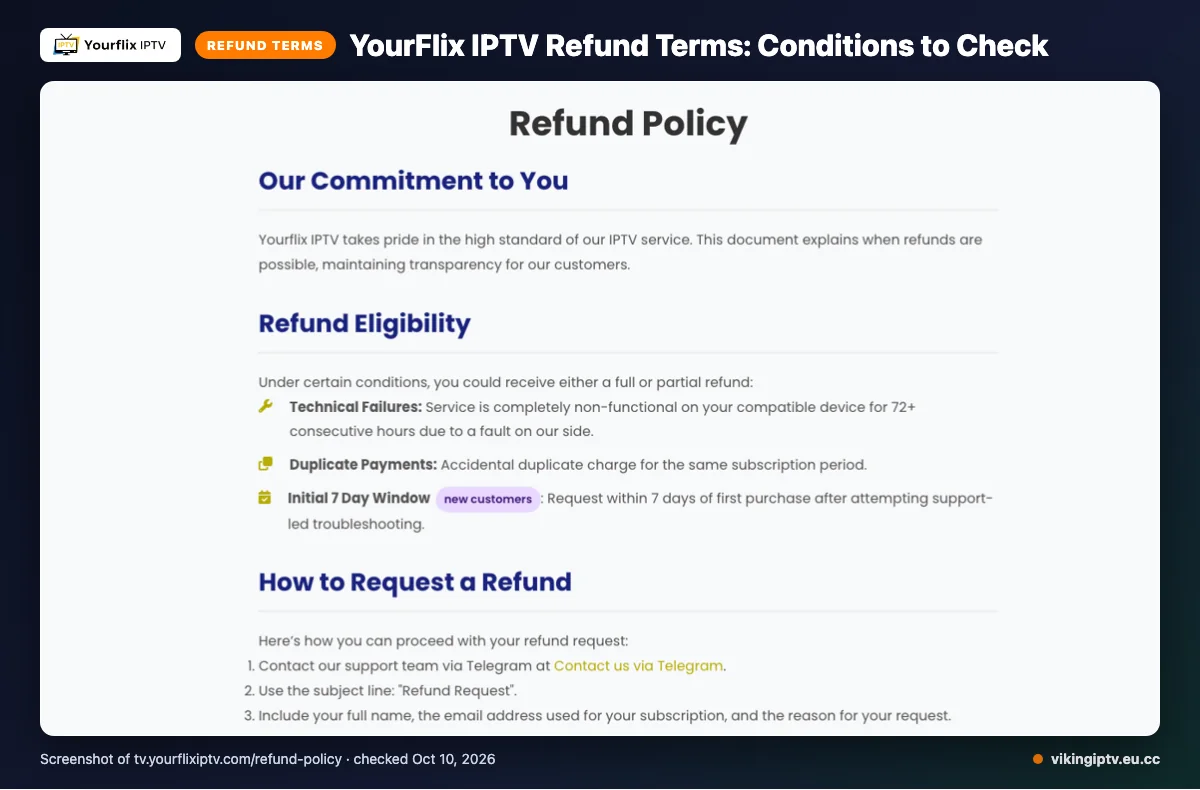
The site says refunds may be available in three cases:
- The service is completely non-functional on a compatible device for 72+ consecutive hours, due to a fault on their side.
- You were charged twice.
- A new customer asks within 7 days of a first purchase, after support-led troubleshooting.
Not refunded: dissatisfaction with the channel list or content, slow or unstable internet, Terms of Service violations, and geo-blocking beyond their control. Renewals are handled case by case.
Requests go via Telegram. Review takes 0–3 business days. After approval, the refund starts the same day, and funds may take 5–10 business days to appear.
Payment methods listed: Visa, MasterCard, American Express, PayPal and Stripe.
YourFlix IPTV pros and cons
Here is the short version, based only on what the site shows. No streaming test was done.
Pros
- Four plan lengths to pick from
- Big channel and VOD claims
- Many device types named
- EPG described as user-friendly
- Visa, MasterCard, American Express, PayPal and Stripe
- Support by email, live chat and Telegram
Cons
- Channel and VOD counts conflict
- Currency not named
- Catch-up and sports details not listed
- Refunds limited to set cases
- One connection per account by default
Quick tip: Count how many of the cons matter on your game day. If sports and a trial are on your list, check those first.
Is YourFlix IPTV legal and safe?
A website check can’t give you a verdict. Legality depends on whether the content is licensed and on the laws where you live, and licensing can’t be confirmed from the site.
This review checked the website only. It did not test the service or audit its security.
Pay with a method that leaves a payment record, and keep your confirmation emails. Then read the Terms of Service yourself, since violations are excluded from refunds.
How to sign up and set up YourFlix IPTV
Setup is usually quick: pick a plan, pay, wait for your login, and add it to a player app. Here are the general steps for a first-time subscriber.
- Pick a plan on the official site, tv.yourflixiptv.com.
- Pay with one of the listed methods.
- Wait for your login details. The delivery time is not listed on its website.
- Install a player app. Our Firestick setup guide and M3U playlist explainer cover the install steps.
- Enter your details in the app.
- Open the channel guide and check that it loads.
Stuck? Refund requests go through Telegram.
Test everything on your own Wi-Fi well before kickoff. If streams stall, try our buffering fix steps.
Quick tip: Do your first login a day before the big game, so any hiccup lands on a quiet evening.
YourFlix IPTV vs Viking IPTV
Comparing two providers is easier side by side. The YourFlix IPTV column below comes from its website only, and details we already covered are not repeated.
| Item | YourFlix IPTV | Viking IPTV |
|---|---|---|
| Plans | Four lengths, 1 to 12 months, as listed above | Five lengths, 1 to 24 months. The 1-month plan is $14.95 and the 12-month plan is $59.95. No contracts and no activation fees. |
| Free trial | We did not find one on the pages we checked | 24-hour free trial |
| Refund | Case-by-case terms, requested via Telegram, as covered above | 7-day refund window |
| Devices | The named list above, including Firestick, MAG and PC | Firestick / Fire TV, Android TV / Google TV, Samsung and LG Smart TV, iPhone / iPad / Apple TV, Android phones, Windows / Mac and MAG box |
The two are close on short plans. The bigger gaps are the trial and how clear the refund path is. A trial lets you test on your own Wi-Fi before paying, and a plain refund window gives you a safety net.
You can see our free trial details and our refund policy before you decide. Compare them with YourFlix IPTV’s own wording, then pick what fits your budget and your game day.
Who should choose YourFlix IPTV, and who should look elsewhere?
YourFlix IPTV is a fair fit if you want general TV and movies on one screen at a modest price. It is a riskier pick if live sports on game day are your main reason to subscribe.
It may suit you if you:
- watch on one device, so the single connection limit won’t bother you
- use a Firestick, Smart TV, Android box or PC
- pay by card or PayPal
- are fine contacting support by chat, email or Telegram
Look elsewhere if you:
- want to test a service before paying, since we found no free trial on the pages we checked
- need several screens running at once
- must have sports channels or pay-per-view fights confirmed first
- care about catch-up, which the site doesn’t list
The big channel and VOD claims are only claims for now. The count mismatches we flagged earlier are a reason to ask questions before you pay.
Quick tip: Send support one message listing your must-have channels and teams. Save the reply before you buy.
Want to see how a trial-first approach feels? We offer a 24-hour free trial, so you can check your games on your own Wi-Fi before you commit.
Frequently Asked Questions
How much does YourFlix IPTV cost?
YourFlix IPTV lists four plans: $14.95 for 1 month, $29.95 for 3 months, $44.95 for 6 months and $59.95 for 12 months. Each plan includes 1 active connection per account, and extra connections can be bought. The site uses a dollar sign but does not name the currency, so confirm it at checkout.
Does YourFlix IPTV have a free trial?
A free trial was not found on the pages checked on 2026-10-10. That means you would likely pay before seeing anything on your own screen. If you want to test first, Viking IPTV offers a 24-hour free trial, so you can check a game-day stream on your own Wi-Fi before paying.
Can you get a refund from YourFlix IPTV?
These are a service that is completely non-functional on a compatible device for 72+ consecutive hours, a duplicate payment, or a request within 7 days of a new customer’s first purchase after support-led troubleshooting. Requests go through Telegram. Dissatisfaction with the channel list and slow internet are not covered.
Is YourFlix IPTV legal and safe?
A website check can’t answer that. This review looked at the website only and did not audit security, so check your local rules and pay with a method you trust.