
Disclosure: This review is published by Viking IPTV, which sells its own IPTV service. Viking IPTV and Nitro IPTV share common ownership. It is based on Nitro IPTV’s website pages checked on October 10, 2026 and does not include streaming tests.
This nitro iptv review gives you the short answer first: Nitro IPTV sells four single-connection plans, from $14.95 for 1 month to $59.95 for 12 months. The pages checked showed no free trial, and refunds apply only in set cases.
Picking a service right before kickoff is stressful, so we kept the details plain. Everything here comes from the official website, checked on 2026-10-10, and no streaming test was run. You will also see how it lines up against Viking IPTV.
What is Nitro IPTV?
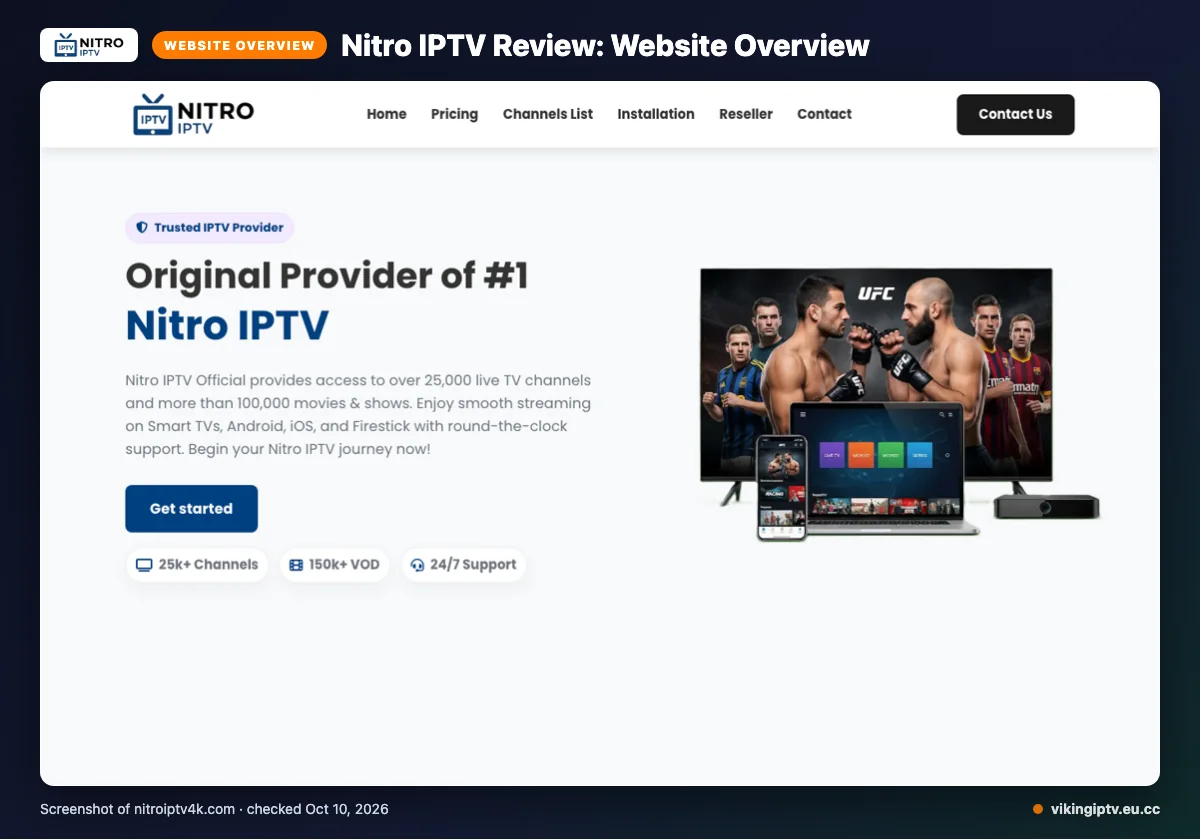
Nitro IPTV is a subscription IPTV service that sells live TV and on-demand video. Its official site lists viewers in the USA, UK, Canada, Europe, Asia and MENA as its audience.
This is a website-based review, with facts checked on 2026-10-10. We did not run a streaming test, so everything here comes from what the site says.
Quick tip: Write down what you need first, like devices, number of screens and game-day channels. Then check each claim against your list.
What does Nitro IPTV offer?
Nitro IPTV says it offers 25,000+ live TV channels and 100,000+ VOD. The site also says the VOD library is updated daily.
The content count messaging is not fully consistent. A homepage graphic says 150k+ VOD, and the channel-list page title says 10,000+ live channels.
For picture quality, the site lists 4K, 4K Ultra HD, Full HD, FHD, and HD. It also says performance features include anti-freeze technology, load balancing, global CDN, adaptive routing, predictive content prefetch, and fast channel switching.
Device support is listed for Smart TVs, Android boxes, Firestick, MAG devices, iOS, and PC. The only app named is IPTV Smarters.
An EPG is available, and the EPG is described as user-friendly and updated. Catch-up is not listed on its website.
Nitro IPTV pros and cons
Here is the short version, based only on what the site’s own pages say.
Pros
- Four plan lengths to choose from
- Big channel and VOD claims
- An EPG is available
- Several device types are listed
- Card options plus PayPal
- A written refund policy with a 72-hour fault rule
Cons
- We did not find a free trial on the pages we checked
- Catch-up is not listed
- Content counts differ from page to page
- Each plan allows a single connection
- Only one app is named
- No refunds if you dislike the content
Does Nitro IPTV have a free trial, refunds and payment options?
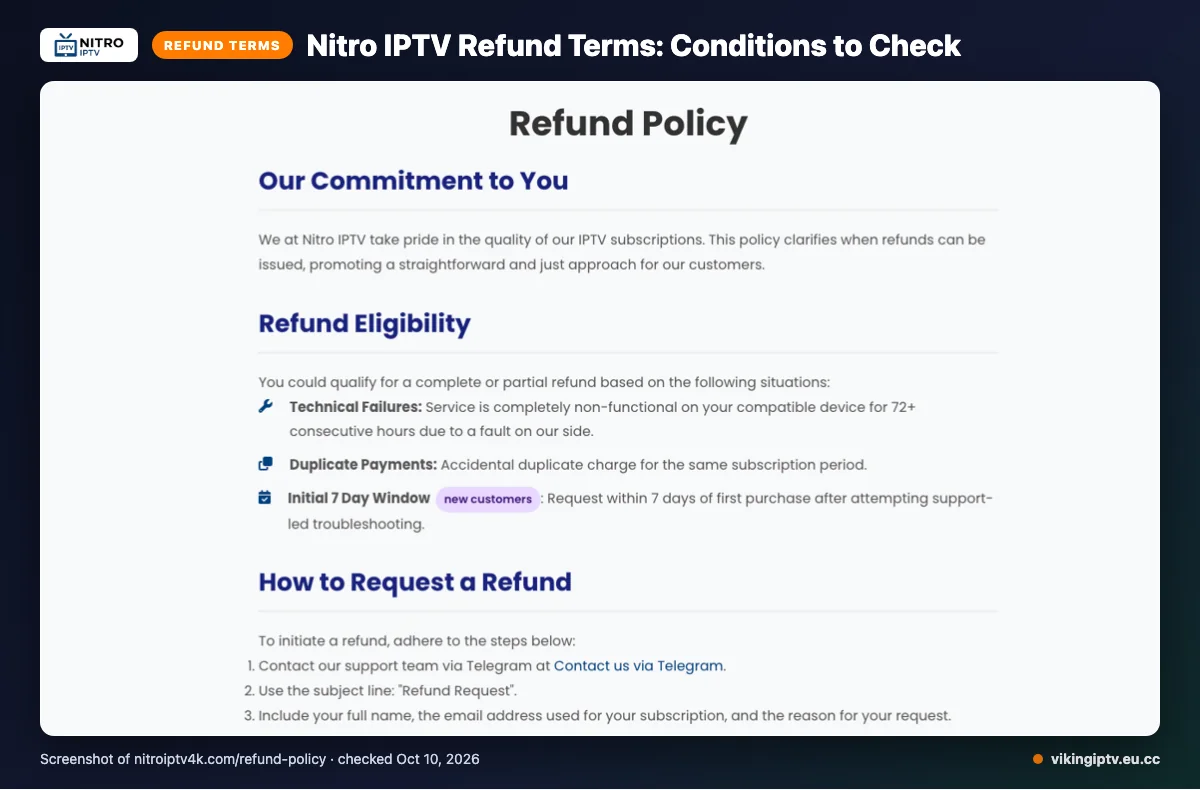
Refunds exist, but only in set cases. You can pay with Visa, MasterCard, American Express or PayPal.
Refunds may be complete or partial in three cases:
- The service is fully non-functional on a compatible device for 72+ consecutive hours because of a fault on their side.
- You were charged twice.
- You are a new customer, ask within 7 days of your first purchase, and tried support-led troubleshooting first.
No refunds are given for dissatisfaction with the channel list or content, slow or unstable internet, Terms of Service violations, or geo-blocking beyond their control. Renewal requests are reviewed individually.
One oddity: the refund policy page contains unfilled payment gateway placeholders. Screenshot the policy before you pay, so you have the wording from the day you bought.
Is Nitro IPTV legal and safe?
It depends on whether the content is properly licensed and on the laws where you live. This review did not verify Nitro IPTV’s licensing, and its website does not settle the question either. Check your local rules before you subscribe.
Habits that keep you safer:
- Pay with a method that offers buyer protection.
- Use a strong, unique password.
- Never share card details by chat or email.
Quick tip: Pay by card or PayPal rather than sending money to a stranger on social media.
Is Nitro IPTV legal and safe?
We can’t confirm either one from its website alone. IPTV is just TV delivered over the internet, and that is legal. Whether a service is legal depends on whether it holds the rights to what it streams, and on the laws where you live.
The pages we checked gave us no licensing details we could verify. That isn’t proof of a problem. It just means you shouldn’t assume everything is covered, and legality is never the same in every country.
One safety detail stood out. The refund policy still contains unfilled placeholders where payment gateway details should be. It looks like unfinished wording, and it’s a small sign the page hasn’t been fully polished.
Before you pay, send support a few plain questions:
- Does the service hold rights for the channels it lists?
- Which payment processor will show on your statement?
- Can they fill in the gaps in the refund policy?
Support is listed by email, live chat and Telegram. A clear, written answer is a good sign. A vague one tells you something too.
Then check your own local rules. If you’re unsure what’s allowed where you live, treat that as a reason to wait, not a reason to rush a purchase before kickoff.
How do you sign up and set up Nitro IPTV?
The steps are the same for most IPTV services. Here is the general flow, not Nitro’s own process.
- Pick a plan on the official site.
- Pay with a method that fits your budget.
- Wait for your login details.
- Install a compatible player app on your device.
- Enter the details in the app.
- Load the channel guide.
- Open one live channel and check it plays.
The site’s delivery time for login details was not listed on its website. Plan around that gap and don’t buy an hour before kickoff.
Quick tip: Do your first test on a quiet evening, so any problem shows up before the big game.
Need help? Our Firestick setup guide covers the install, and the IPTV buffering fix post covers choppy streams.
Nitro IPTV vs Viking IPTV: how do they compare?
The two are close on short plans, but Viking IPTV adds a trial and a 24-month option. Here is the side-by-side, using 1-connection prices.
| Feature | Nitro IPTV | Viking IPTV |
|---|---|---|
| Plans | 1 month $14.95; 3 months $29.95; 6 months $44.95; 12 months $59.95 | 1 month $14.95; 3 months $29.95; 6 months $39.95; 12 months $59.95; 24 months $99.95 |
| Free trial | Not found on the pages we checked | 24 hours |
| Refund | Conditional, see the refund section above | 7 days |
| Devices | Smart TVs, Android boxes, Firestick, MAG devices, iOS, PC | Firestick / Fire TV, Android TV / Google TV, Samsung and LG Smart TV, iPhone / iPad / Apple TV, Android phones, Windows / Mac, MAG box |
The 6-month plan is $5 cheaper at Viking IPTV, and only Viking IPTV lists a 24-month plan. Nitro’s details come from its website only, so check them there before you pay.
Who should choose Nitro IPTV, and who should look elsewhere?
Nitro IPTV may suit you if you watch on one screen and want to pay by card or PayPal. Its device list is wide, so check your TV, box or phone against it.
Look elsewhere if you need a free trial first, catch-up, several screens at once, or clear content counts. Those are the gaps on the pages we checked.
Confirm any gap with the seller in writing before you pay. A saved reply beats a guess on game day.
Quick tip: Ask support in writing about the one thing you care most about, and keep the reply.
Want to test first? We offer a 24-hour free trial at Viking IPTV, so you can try it on your own Wi-Fi before you pay.
Frequently Asked Questions
Does Nitro IPTV work in the US and Canada?
Nitro IPTV’s official site lists the USA and Canada among its regions, so it says it serves viewers in both. This review is based on the website only, with no streaming test. The refund policy also says geo-blocking issues beyond its control are not refunded, so check your channels early.
How can you contact Nitro IPTV support?
The site lists three ways to reach support: email, live chat and Telegram. The pages checked did not show support hours or a phone number. Support also matters for refunds, because the policy asks for support-led troubleshooting before a new customer request within 7 days of first purchase.
What does it mean that Nitro IPTV is not IP-locked?
The site says the service isn’t IP-locked. In plain terms, that usually means your login isn’t tied to one internet address, so it isn’t limited to a single home network. The site doesn’t explain more, and every listed plan allows a single connection at any given time.
Does Nitro IPTV include PPV or live sports events?
Nitro IPTV claims 25,000+ live TV channels, but the pages checked did not mention PPV or name specific sports events. If fight night or the playoffs matter to you, ask live chat before paying. For comparison, Viking IPTV lists PPV and premium events as included.
How fast do you get your login details after paying Nitro IPTV?
The pages checked did not state how fast login details arrive. The general flow is to pay, wait for your details, then install a player app. Ask live chat for a timeframe before you buy. For comparison, Viking IPTV sends login details by email within 5 to 15 minutes.
Ready to pick your plan before the next game?
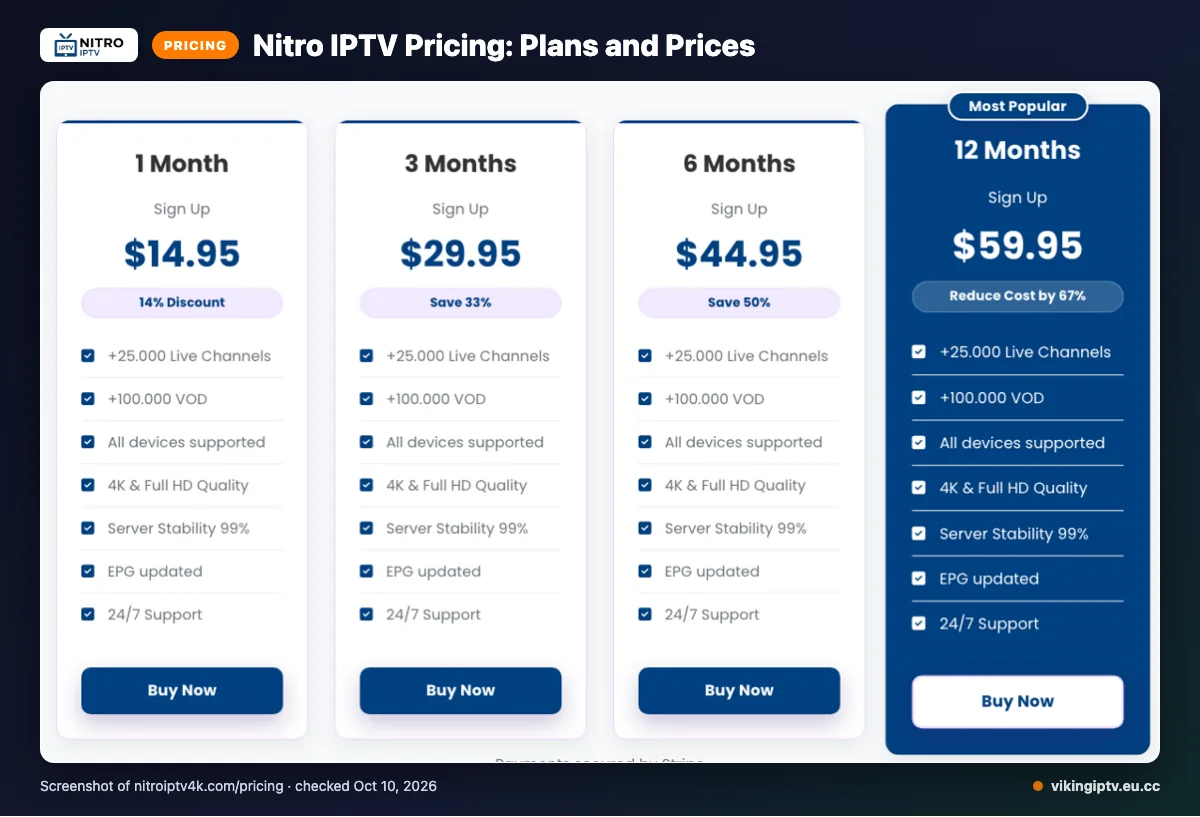
Nitro IPTV looks simple on paper: four plan lengths, card and PayPal payments, and a written refund policy. But the content counts on its own site don’t match, and we found no free trial. Read the refund rules and check your device against its list before you pay.
Quick tip: if you do try it, start with the 1-month plan at $14.95. That keeps your risk small while you see how it runs on your own Wi-Fi.
Want to see a service in action before you spend anything? You can start the free 24-hour trial from Viking IPTV and set it up once on your own screen.