
Disclosure: Viking IPTV sells its own IPTV service, and Viking IPTV and Nexus 4K TV IPTV share common ownership. Everything below comes from Nexus 4K TV IPTV’s own website, read on October 11, 2026; no streaming tests were run.
This nexus 4k tv iptv review finds published plans and broad content claims, but some details need clarification before you subscribe. The website lists different channel and on-demand counts across its pages.
Compare the plan terms, device options, and policies with your game-day needs, including Viking IPTV.
Nexus 4K TV IPTV at a glance
Choosing an IPTV service for game day can be tough when every site makes big promises. This Nexus 4K TV IPTV review gives you a clear starting point before you compare the details.
Nexus 4K TV IPTV is a subscription service whose official site presents it for live television and on-demand viewing. The site lists the USA, Canada, UK, Europe, Asia, and MENA as regions, with regional packages also mentioned for the USA, Canada, and Europe. You can visit the Nexus 4K TV IPTV official site to read its current information.
If you’re a cord-cutter, the service may catch your eye as you look for an alternative to traditional TV. Its stated regions may also help you decide whether to investigate further, especially if you’re comparing options across the US or Canada. Keep in mind that a listed region is not the same as a promise about what you’ll be able to watch.
This is a website-based overview, not a hands-on streaming review. No viewing test was done, so you won’t find verified claims about picture quality or reliability here. As you consider it for a kickoff or playoff night, use the site’s stated details to judge whether it suits your needs.
The sections that follow cover its offer, costs, policies, and setup separately. That makes it easier to check the practical details before you choose a service.
What’s included with Nexus 4K TV IPTV
The site lists live TV and on-demand content, but its catalogue figures conflict; see the earlier count comparison. Listed quality options are 4K, HD, Full HD, FHD, and 4K Ultra HD. These are website claims, not verified playback results.
Compare the stated quality options with what your screen and internet plan can handle. That can help you choose settings that fit your setup before kickoff.
Named devices include Smart TVs, Android, Android boxes, Firestick, MAG devices, MAG Box, iOS, and PC. IPTV Smarters is the app listed on the site.
An updated EPG is available to view program listings. Catch-up is not listed on its website.
How much does Nexus 4K TV IPTV cost? Plans and prices
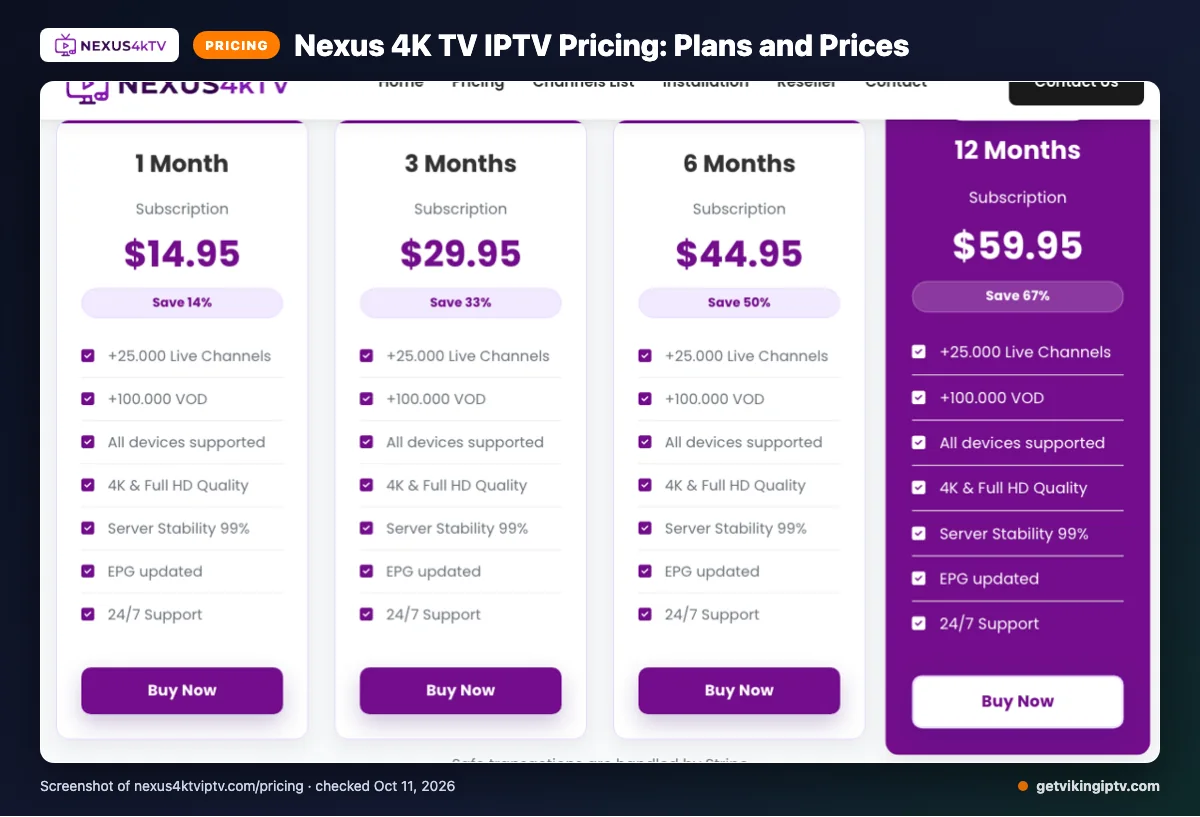
Nexus 4K TV IPTV lists four subscription options, from one month to twelve months. The prices below were checked on 2026-10-11.
The site uses “$” but does not name the currency.
| Plan | Duration | Price | Connections |
|---|---|---|---|
| 1 Month Subscription | 1 Month | $14.95 | 1 active connection |
| 3 Months Subscription | 3 Months | $29.95 | 1 active connection |
| 6 Months Subscription | 6 Months | $44.95 | 1 active connection |
| 12 Months Subscription | 12 Months | $59.95 | 1 active connection |
Quick tip: Check the currency with the seller before treating a listed price as your final cost.
Nexus 4K TV IPTV trial, refund policy and payment options
We did not find a free trial on the pages we checked. Listed payment methods are Visa, MasterCard, American Express, PayPal, and Stripe.
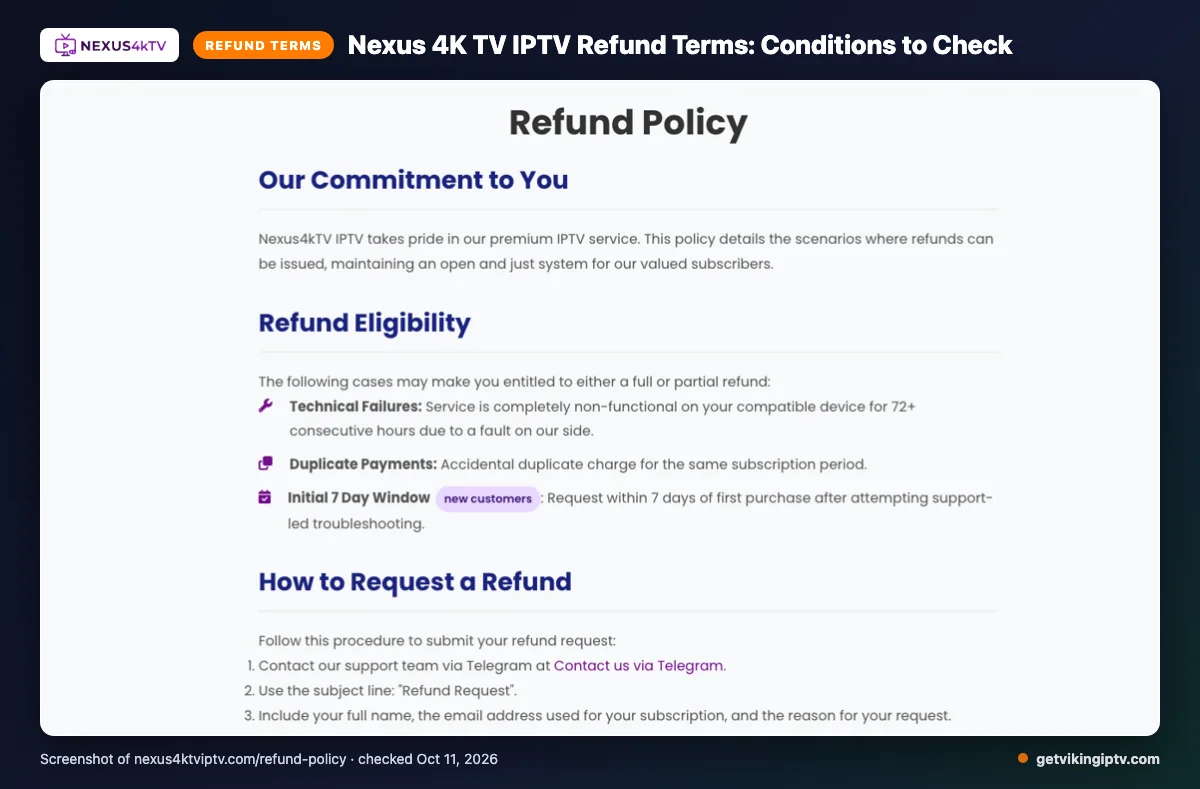
The stated refund grounds include service completely non-functional on a compatible device for 72+ consecutive hours due to a fault on their side, accidental duplicate charges, or a new customer request within 7 days of first purchase after support-led troubleshooting. Meeting a stated ground does not mean every request qualifies.
Change-of-mind refunds are typically unavailable after the first 7 days. Renewal refunds are decided case by case. Keep purchase and support records handy if you need to discuss a refund request.
The pros and cons of Nexus 4K TV IPTV
For a budget-conscious fan, the site provides useful details to compare, but some points need clarification. Treat published descriptions as claims, not confirmation of game-day stream performance.
Pros
- Published pages outline catalog details, listed quality options, devices, the app, and EPG information.
- You can review practical setup and viewing details before deciding.
Cons
- Catalogue figures conflict across pages; see the earlier feature section for that discrepancy.
- Trial availability and the currency behind the dollar sign need clarification before purchase.
- Published details do not establish how streams will perform on your own Wi-Fi.
Is Nexus 4K TV IPTV safe and legal to use?
IPTV is a delivery method, not a guarantee that every channel is licensed. Legality depends on distribution rights and the laws where you watch.
For Nexus 4K TV IPTV, the pages checked do not establish its content licensing or provide enough detail to verify its data-security practices. That does not prove the service is unsafe or unlawful, but you should confirm these points before paying.
Before subscribing, look for clear answers about who owns the service, what content it may distribute, and how it handles your personal information. If the information is unclear, ask the provider directly and save its response. For game day, check the rules that apply in your location rather than assuming a service is authorized everywhere.
- Check your local laws and ask the provider for licensing information.
- Read the privacy and payment terms before sharing personal or billing details.
- Use official app stores when available, and avoid unfamiliar downloads or requests for unnecessary permissions.
Use a unique password for any account, and keep your device software current. A VPN does not make unlicensed content legal, and it cannot confirm a provider’s security practices. Treat site claims as claims unless you can verify them independently.
Getting started: how to sign up for Nexus 4K TV IPTV and set it up
Want your screen ready before kickoff? Keep setup simple and follow the instructions sent after purchase.
-
Choose the subscription plan you reviewed earlier, then complete checkout. Check your order details before submitting payment.
-
Watch your email for activation details and setup instructions. Check your spam folder if the message does not appear.
-
Connect your chosen device to the internet, preferably on your own Wi-Fi. Open the app listed earlier or install it using a trusted source.
-
Follow the emailed instructions and enter the activation details exactly as provided. Avoid guessing any login fields or settings.
-
Open the service and check that it loads. Try a familiar channel before game day, so you have time to address setup trouble.
If something does not work, compare your entries with the email first. Then contact the provider’s support for help with its specific setup steps.
Quick tip: Set it up once before kickoff, not during the opening minutes. Keep the setup email nearby in case you need to check a detail.
Viking IPTV vs Nexus 4K TV IPTV: side by side
Compare the published plan details, trial, refund information, and device lists before game day. Nexus details already covered above are referenced rather than repeated.
| Compare | Viking IPTV | Nexus 4K TV IPTV |
|---|---|---|
| Plans | 1 month: $14.95; 3 months: $29.95; 6 months: $39.95; 12 months: $59.95; 24 months: $99.95. One connection per plan. | See the plan and price table above. |
| Trial | 24-hour free trial. | See the earlier trial details. |
| Refund | 7-day refund policy. | See the earlier refund-policy details. |
| Devices | Fire TV, Android and Google TV, Samsung and LG TVs, Apple devices, Windows, Mac, and MAG box. | See the device list covered earlier. |
Viking lists a 24-hour trial and plans through 24 months. For Nexus’s plan, trial, refund, and device details, use the earlier sections rather than assuming unlisted terms.
Check current terms before subscribing, especially if you want to watch playoffs on multiple screens. We’d be glad to help you try Viking IPTV with a free trial before choosing.
Is Nexus 4K TV IPTV right for you? Who should pick it and who should look elsewhere
The plain verdict: consider it if its listed regions and packages fit your needs. Based on its published site, Nexus 4K TV IPTV is an IPTV service.
Its listed regions are USA, UK, Canada, Europe, Asia, and MENA. Regional packages are also mentioned for the USA, Canada, and Europe.
That gives you details to compare while choosing live-TV options before game day. Look elsewhere if you need regional or sports coverage details the site does not clarify.
Quick tip: Check whether a regional package fits your location before comparing plans.
Want another option to compare? We invite you to try Viking IPTV’s 24-hour free trial.
Frequently Asked Questions
What should you check before subscribing?
Confirm the plan price, currency, and auto-renewal terms before checkout. Review the refund conditions, check whether your device fits the listed options, and look for licensing information relevant to where you watch.
We invite you to compare another option and start the free 24-hour trial with Viking IPTV.