
Disclosure: Viking IPTV sells its own IPTV service, and Viking IPTV and 4K IPTV Spot share common ownership. Everything below comes from 4K IPTV Spot’s own website, read on October 10, 2026; no streaming tests were run.
This 4k iptv spot review summarizes the provider’s website, not a streaming test. You’ll find its listed plans, features, and details to check before game day.
The site’s content counts conflict, so compare its claims carefully. If you’re weighing budget options, consider the Viking IPTV offer alongside them.
4K IPTV Spot at a glance
Checking whether a service lists your market before game day? This review gives you a website-based overview, not a streaming test.
4K IPTV Spot lists USA, UK, Canada, Europe, Asia, and MENA. Its site also names France, Turkey, Greece, Belgium, Netherlands, Arabic, Latin America, India, and Germany. These categories suggest the viewers it targets, but they do not verify service coverage.
We summarize the website’s information here; we did not test streaming. Use the listed categories as a starting point when checking whether the service may suit your region.
Quick tip: Before game day, check whether your region appears among the site’s listed markets.
What’s included with 4K IPTV Spot
4K IPTV Spot says its lineup includes 25,000+ live TV channels and 100,000+ VOD titles. These are the catalog figures the site advertises.
Its stated quality labels are 4K, HD, Full HD, FHD, and 4K Ultra HD. Named device categories include Smart TVs, Android boxes, Firestick, MAG devices, iOS, and PC. The listed app is IPTV Smarters.
The site describes an Electronic Program Guide (EPG) for navigating channels. It also says viewers can catch up on popular shows and series, but does not detail a specific catch-up feature. Before kickoff, check whether your device and app combination matches the names shown on the site.
How much does 4K IPTV Spot cost? Plans and prices
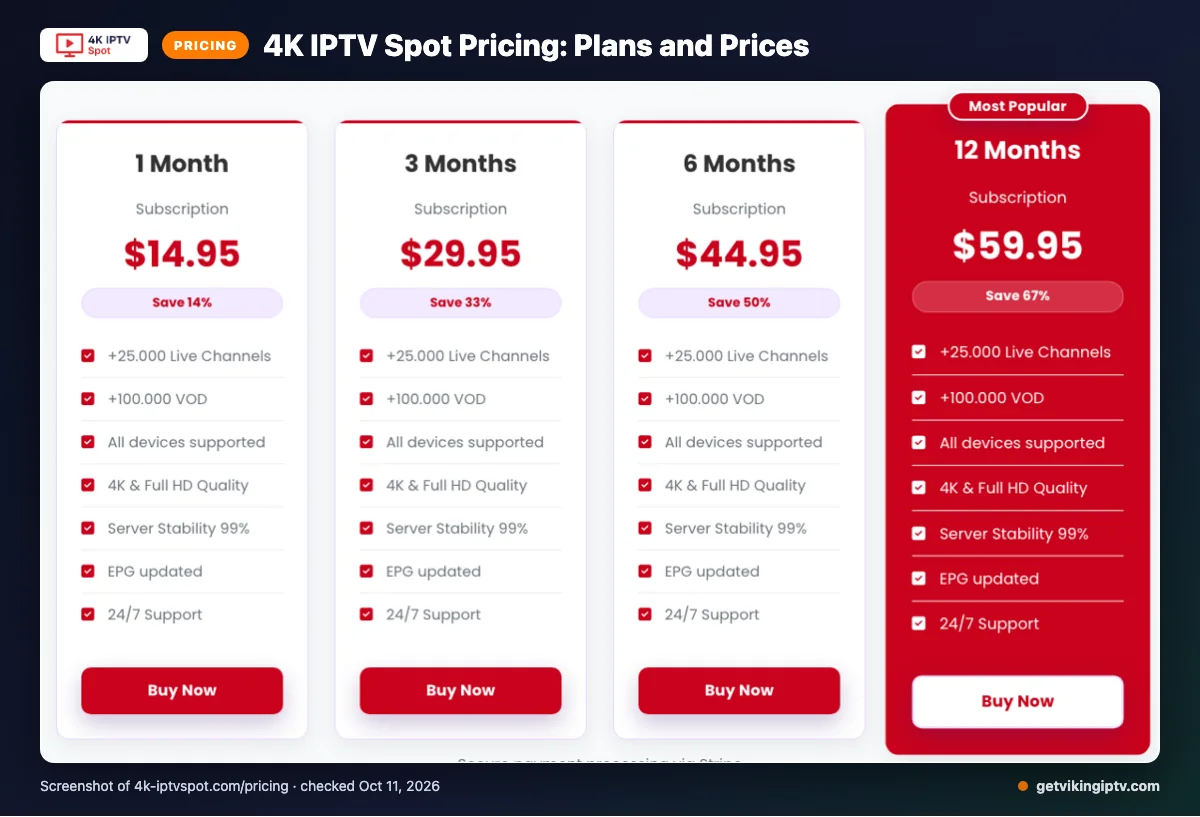
The site lists four plans, each with one active connection. We checked the pricing pages on 2026-10-10.
| Plan | Price | Connection limit |
|---|---|---|
| 1 Month | $14.95 | 1 active connection |
| 3 Months | $29.95 | 1 active connection |
| 6 Months | $44.95 | 1 active connection |
| 12 Months | $59.95 | 1 active connection |
Prices use the $ symbol, but the site does not name the currency.
Quick tip: Compare the full checkout total before choosing a term, since the currency is unspecified.
4K IPTV Spot trial, refund policy and payment options
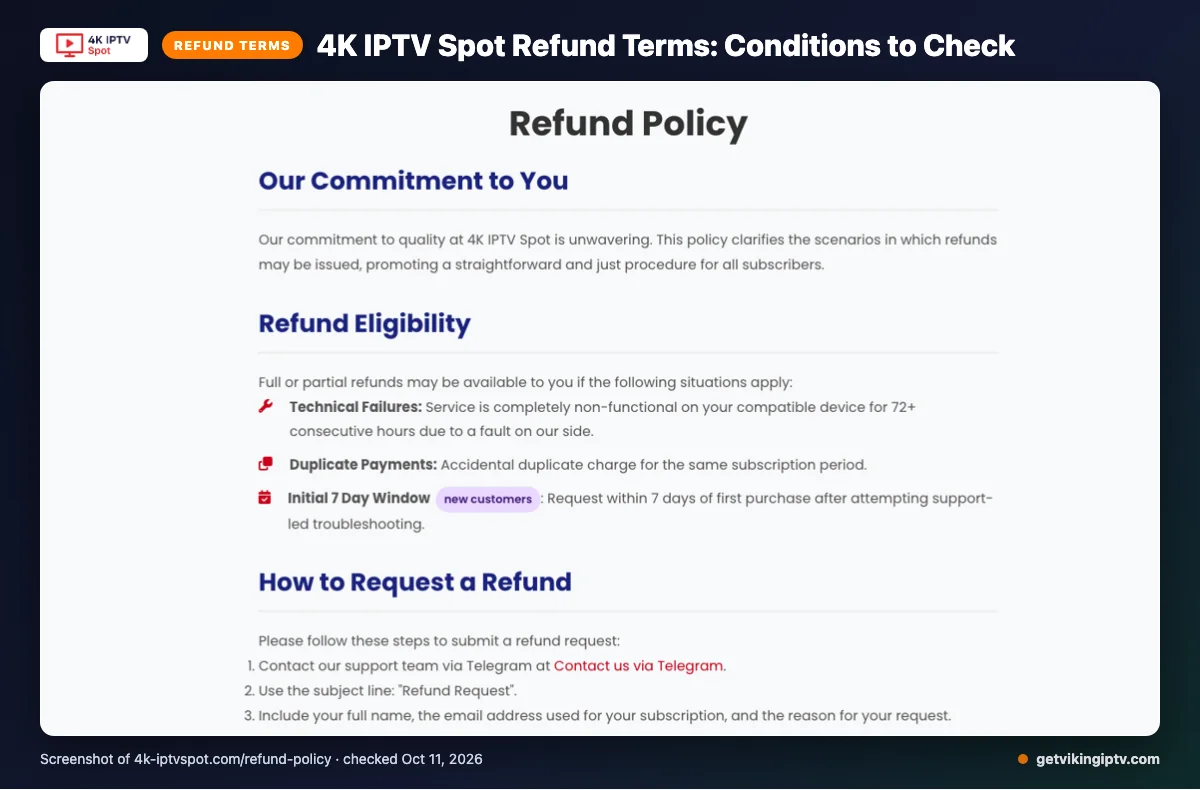
We did not find a free trial on the pages we checked. The 4K IPTV Spot policy says full or partial refunds may be available for qualifying cases.
These include service completely non-functional on a compatible device for 72+ consecutive hours because of a provider-side fault, or accidental duplicate charges. Eligible new customers may also request a refund within 7 days of purchase after support-led troubleshooting.
Refunds exclude dissatisfaction with channels or content, slow or unstable internet, Terms of Service violations, and geo-blocking beyond the provider’s control. Renewal refunds are handled case by case; change-of-mind refunds are typically unavailable after the first 7 days.
Listed payment options are Visa, MasterCard, American Express, PayPal, and Stripe. Keep checkout records and support correspondence if you may need to document a refund request.
The pros and cons of 4K IPTV Spot
What looks useful?
- The site says subscriptions activate instantly after payment, and its VOD collection refreshes daily.
- It lists a Global CDN, anti-freeze load balancing, adaptive routing, and instant channel switching as service features.
What should you keep in mind?
- The website gives conflicting channel and VOD counts, making its published totals unclear.
- These feature claims do not establish actual stream performance. Playback was not tested for this review.
Quick tip: Treat performance wording as a site claim, not a promise about your connection on game day.
Is 4K IPTV Spot safe and legal to use?
IPTV legality depends on properly licensed content and the laws where you live. 4K IPTV Spot cannot be called legal or illegal for every viewer or location.
This website-based review cannot verify the service’s licensing or independently confirm its safety. A provider’s published description alone does not establish licensing status or settle local legal questions. Before subscribing, read the service’s own terms and check the rules that apply where you live. Check local rules rather than relying on a general claim about IPTV legality.
Getting started: how to sign up for 4K IPTV Spot and set it up
Keep setup straightforward: confirm your device, complete checkout, then follow the provider’s current instructions. A little preparation can help you sort out setup before kickoff.
-
Check your device and app first. Confirm your device can use the app you plan to install, and review the provider’s setup instructions before ordering.
-
Read the checkout page carefully. Choose your subscription, review the order details, and save your confirmation for reference.
-
After checkout, look for account or connection instructions on the confirmation page or in any messages you receive. The exact steps can depend on the instructions provided for your subscription.
-
Open IPTV Smarters and follow those instructions to add your service details. Use the information supplied by the provider rather than guessing at fields or settings.
-
Before game day, connect your device to your home Wi-Fi and check that the app opens. Try a channel and confirm you can hear audio and see a picture.
Quick tip: Set it up once before kickoff, so you have time to check the connection and fix any login issues.
Want to compare another option first? We offer a 24-hour Viking IPTV free trial.
Viking IPTV vs 4K IPTV Spot: side by side
Comparing plans, trial terms, refunds, and devices helps you choose before kickoff. For 4K IPTV Spot details already covered, use the earlier pricing, trial, refund, and device sections.
| What to compare | Viking IPTV | 4K IPTV Spot |
|---|---|---|
| Plans | One-month $14.95, three-month $29.95, six-month $39.95, 12-month $59.95, or 24-month $99.95. | See the pricing section above for its listed terms and prices. |
| Trial | 24-hour free trial. | See the trial section above. |
| Refund | Refund period: 7 days. Review the refund policy for terms. | See the refund section above for qualifying cases and limits. |
| Devices | Fire TV, Android TV, Samsung and LG Smart TVs, Apple devices, Android phones, Windows, Mac, and MAG boxes. | See the device section above for its listed categories. |
For game day, compare the plan length you want and confirm your device appears on the provider’s list. Viking IPTV lists a trial, while the earlier section covers what we found for 4K IPTV Spot. Check current terms before you subscribe, especially if you may need a refund.
Is 4K IPTV Spot right for you? Who should pick it and who should look elsewhere
4K IPTV Spot may suit you if its published offer matches your viewing needs and you’re comfortable deciding from the information available. For game day, make sure the details you reviewed fit your plans before you subscribe.
Pick it if you’ve read the earlier sections, understand the terms, and feel ready to make your own call. A clear idea of what matters most to you—such as your usual viewing habits and setup—can make that decision easier.
Look elsewhere if you need independently verified performance or want more certainty before paying. The published information alone may not answer every question you have about watching a specific event. Don’t treat a label or promise as proof of how a stream will look on your connection.
Before kickoff, check that you’re comfortable with the service details and your own internet setup. If something still feels unclear, pause and seek an answer before committing. A little planning beats sorting out a subscription during the game.
If you’d rather compare another option first, we invite you to try the 24-hour Viking IPTV free trial before deciding.
Frequently Asked Questions
What to Check Before You Choose
Review the listed plan, connection limit, refund terms, and device instructions before paying. The site’s published channel and VOD counts conflict, and this review cannot verify streaming performance, licensing, or safety.
We invite you to start the free 24-hour trial with Viking IPTV.