
Disclosure: This review is published by Viking IPTV, which sells its own IPTV service. Viking IPTV and KenoaTV IPTV share common ownership. It is based on KenoaTV IPTV’s website pages checked on October 10, 2026 and does not include streaming tests.
This KenoaTV IPTV review sticks to what the official site says. It promises a huge channel and on-demand library, four single-connection plans, and several device types. We did not find a free trial on the pages we checked.
Big numbers are easy to print and hard to verify, so read them as claims, not results. No streaming test was done here. Below you will also see how the offer lines up against Viking IPTV, so you can choose before the next kickoff.
What is KenoaTV IPTV?
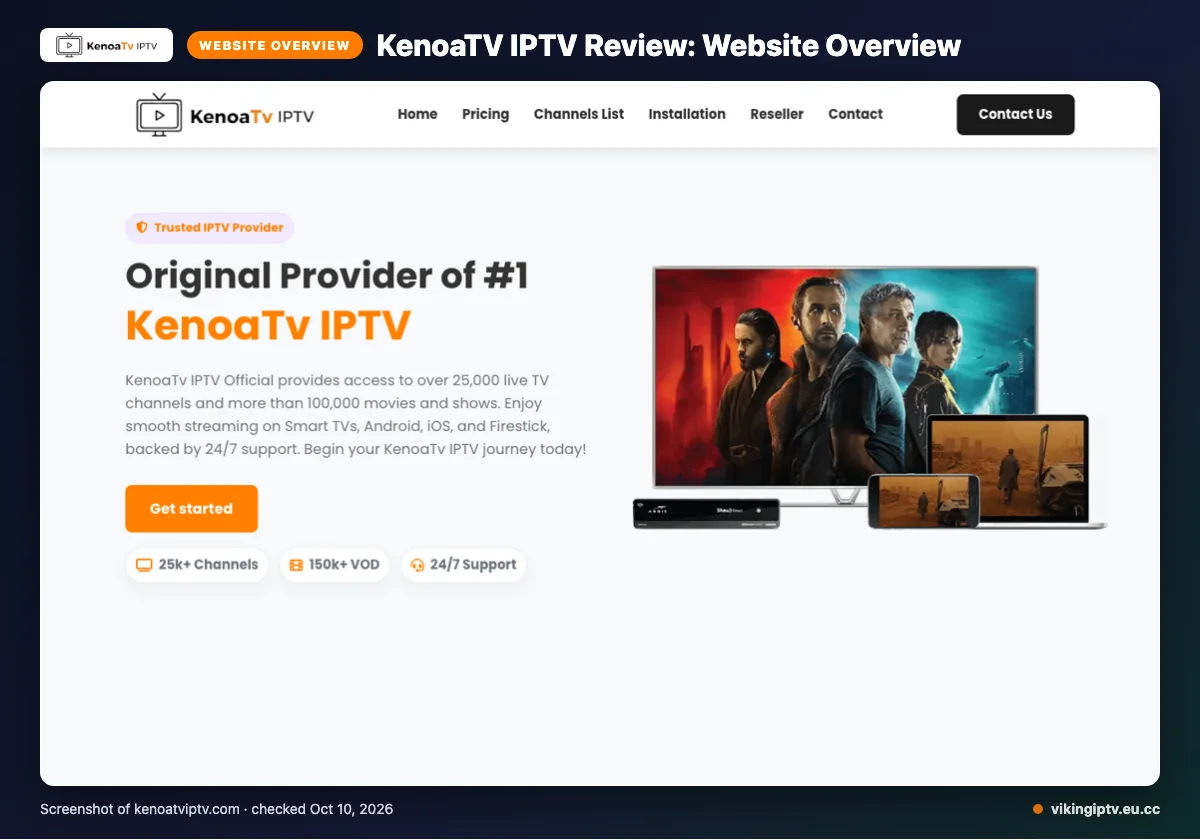
KenoaTV IPTV is an IPTV subscription service. You can see what it says about itself on its official site.
The site names the USA, UK, Canada, Europe and Asia. It also lists regional packages for the USA, Canada, Europe and MENA, so viewers in the US and Canada can find a package aimed at them.
This review uses the website only. We checked the facts on 2026-10-10 and did no streaming test.
Quick tip: Read every number in this review as “the site says,” not as something we measured.
What does KenoaTV IPTV offer?
The site promises a large live and on-demand library, several quality labels, many device types and an updated guide. Here is what it says.
Channels and VOD
The site claims 25,000+ live channels and 100,000+ VOD titles. The counts are inconsistent, though. One page title says 10,000+ channels, and the homepage says 150k+ VOD.
It also lists Global CDN, anti-freeze technology and load balancing, predictive content prefetch, instant channel switching, a daily VOD refresh and “Server Stability 99%”. Treat these as marketing. If you see two counts, ask support which one applies to your plan.
Quality, devices and apps
Quality labels are 4K, HD, Full HD, FHD and 4K Ultra HD. Listed devices are Smart TVs, Android, iOS, Firestick, Android boxes, MAG devices, MAG Box and PC. The one app named is IPTV Smarters.
A device that is not named is not ruled out. Just confirm it with support first.
EPG and catch-up
The site says “EPG updated” and describes a user-friendly guide. Catch-up is not listed on its website. New to guides? Our simple EPG explainer covers the basics.
KenoaTV IPTV plans and prices
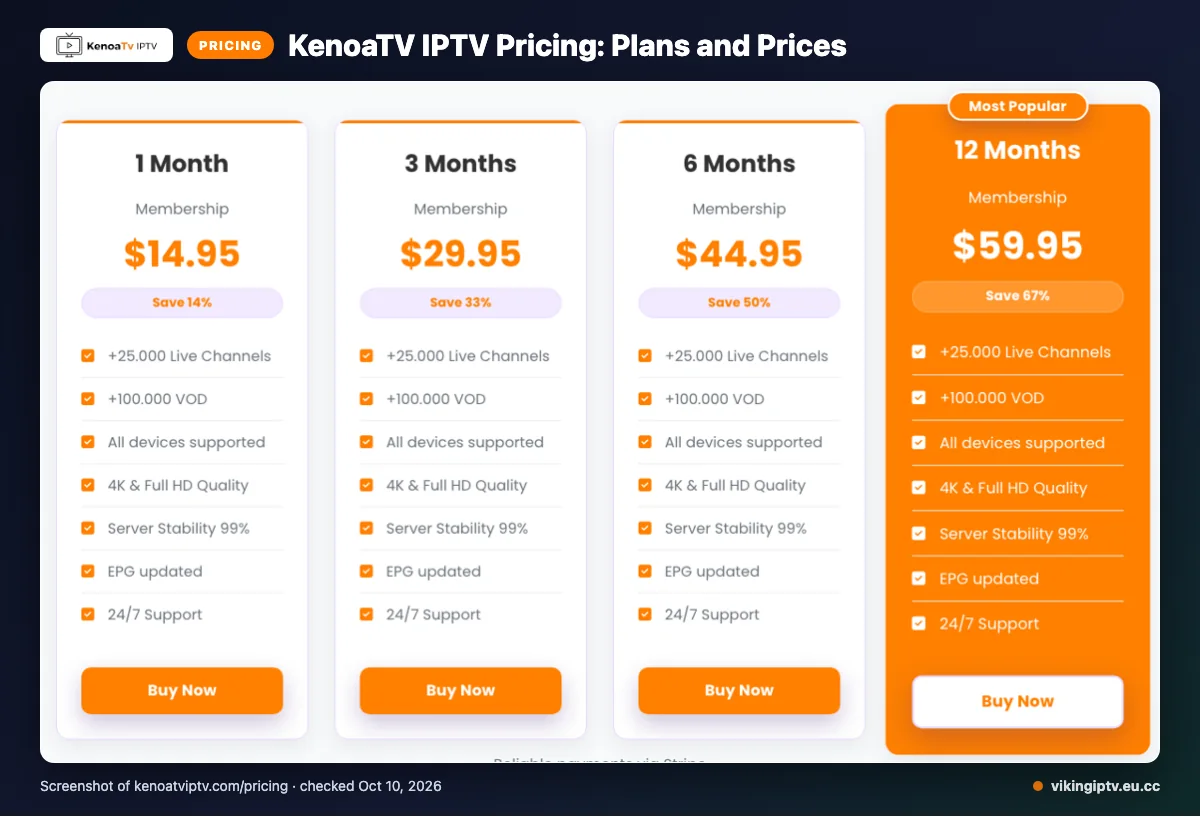
KenoaTV IPTV lists four plans, from 1 month to 12 months. Prices below were checked on 2026-10-10 and may change, so confirm them at checkout.
| Plan | Duration | Price (USD) | Connections |
|---|---|---|---|
| 1 Month Subscription | 1 Month | $14.95 | Single connection |
| 3 Months Membership | 3 Months | $29.95 | Single connection |
| 6 Months Membership | 6 Months | $44.95 | Single connection |
| 12 Months Membership | 12 Months | $59.95 | Single connection |
The site’s FAQ says the standard plan covers a single connection. Extra connections can be bought at checkout or requested through support. We did not see an extra-connection price on the website.
Longer plans are not automatically cheaper per month, so compare the length you actually need.
Quick tip: Count how many screens watch at once in your home on game day, then check the connection limit before you pick a plan.
Free trial, refunds and payment at KenoaTV IPTV
The payment methods listed are Visa, MasterCard, American Express and PayPal.
What the refund wording means
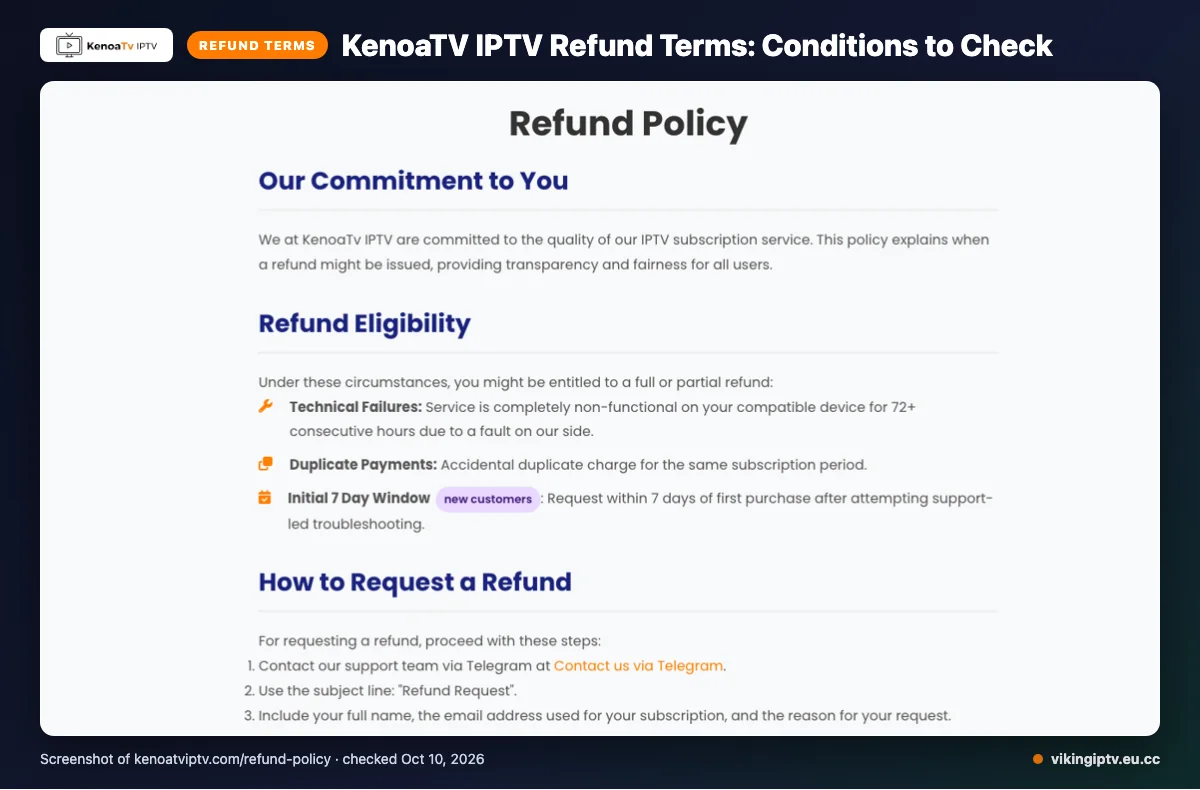
Refunds “might be available” in three cases. The service is completely non-functional on a compatible device for 72+ consecutive hours because of a fault on their side. You paid twice. Or you ask within 7 days of a first purchase, after support-led troubleshooting.
They do not refund dislike of the channel list or content, slow or unstable internet, Terms of Service violations, or geo-blocking beyond their control. After 7 days, change-of-mind refunds are typically not granted. Renewals are evaluated individually.
Approved refunds are handled within 3 business days. The money could still take 5-10 business days to appear.
Since the wording says “might,” keep screenshots and the dates of your support chats.
KenoaTV IPTV pros and cons
These lists reflect what the website says, not tested performance.
Pros
- Large channel and VOD claims.
- Several device types are listed.
- An EPG (on-screen guide) is described.
- Four plan lengths to pick from.
- Card and PayPal payment options.
- Support by email, live chat and Telegram.
Cons
- We did not find a free trial.
- Channel and VOD counts conflict.
- Catch-up is not listed.
- One connection by default.
- Strict refund exclusions, and a 7-day window for change-of-mind requests (see the refund section).
Is KenoaTV IPTV legal and safe?
Legality depends on whether the content is licensed and on the laws where you live. We cannot confirm the licensing of this service from its website, so we make no claim either way.
Check where the site names its terms of service and company details. Then follow these habits:
- Pay with a method that offers dispute options.
- Use a unique password.
- Never share card details in chat.
- Save the order confirmation and the terms page as they stood on the day you paid.
Don’t lean on the 99% stability line for protection. It is a marketing statement.
How to sign up and set up KenoaTV IPTV
Signing up for any IPTV service follows the same basic path. Here are general steps, not KenoaTV-specific screens we have not seen.
- Pick a plan length that fits your budget.
- Check the connection count against the screens you use at once.
- Pay with a method you trust.
- Wait for your login details. Delivery time is not listed on its website.
- Install a compatible app. See our Firestick setup guide and the M3U playlist explainer.
- Enter your details in the app.
- Open the guide and check that channels load.
In the first days, try one live channel and one on-demand title on your own Wi-Fi.
Quick tip: test the service on a quiet evening before a big game, not at kickoff.
KenoaTV IPTV vs Viking IPTV
Two tabs open, one budget, and kickoff getting closer. Here is how the two services compare on what each puts in writing.
| Feature | KenoaTV IPTV (per its site) | Viking IPTV |
|---|---|---|
| Plans | Four lengths, 1 to 12 months, one connection each | Five lengths, 1 to 24 months, $14.95 to $99.95 for one connection |
| Free trial | None found on the pages we checked | 24-hour trial |
| Refund | Condition-based, with the 7-day first-purchase rule covered above | 7-day refund window |
| Devices | The list covered above, with IPTV Smarters named | Firestick / Fire TV, Android TV / Google TV, Samsung and LG Smart TV, iPhone / iPad / Apple TV, Android phones, Windows / Mac, MAG box |
What stands out?
The trial is the biggest gap. With Viking, you can try it for 24 hours on your own Wi-Fi before paying anything. For KenoaTV, we did not find a trial, so you would be paying before you see it work.
Price is close at the shorter lengths. Viking’s 6-month plan costs less than the one KenoaTV lists. Viking also adds a 24-month option if you want to set it up once and forget it.
Refunds differ in style. Viking’s refund policy gives a simple 7-day window, while KenoaTV’s wording depends on specific conditions. Read both before you pay.
Who should choose KenoaTV IPTV, and who should look elsewhere?
Choose KenoaTV IPTV if you watch on one screen, like a big catalog on paper, and can live with conditional refund wording. Look elsewhere if you want to try before you pay or need several screens at once. Our verdict is cautious: it is worth a close look, but only after you confirm the terms yourself.
Who is it a good fit for?
It suits a solo viewer who pays by card or PayPal and wants a plan length to match. These points help:
- You watch alone, on one device at a time.
- You accept the refund conditions described earlier.
- You are fine paying before you have seen it run.
Who should look elsewhere?
Skip it for now if any of these sound like your home on game day:
- You want a trial first. We did not find one on the pages checked.
- Two or three people watch different games at once.
- You want a plain change-of-mind window with few conditions.
- You need proof of performance, since we ran no streaming test.
Quick tip: Before paying anyone, write down the one thing you cannot live without, like a single local game feed. Then ask support about it in writing and keep the reply.
If a risk-free look matters most, we offer a 24-hour free trial you can run on your own Wi-Fi before you decide anything.
Frequently Asked Questions
Is KenoaTV IPTV legal and safe?
We cannot confirm that from the website alone. Legality depends on whether the content is licensed and on the laws where you live, and the site does not let us verify licensing. Look for terms of service and company details before you pay, and use a payment method you trust.
How much does KenoaTV IPTV cost?
KenoaTV IPTV lists four plans: $14.95 for 1 month, $29.95 for 3 months, $44.95 for 6 months and $59.95 for 12 months. Each is a single connection.
Does KenoaTV IPTV have a free trial?
That does not prove none exists, so ask support before you pay. Viking IPTV, by comparison, offers a free 24-hour trial, which lets you try it on your own Wi-Fi first.
Can you get a refund from KenoaTV IPTV?
Maybe, but only in set cases. The site says refunds might be available if the service is completely non-functional on a compatible device for 72+ consecutive hours, for duplicate payments, or within 7 days of a first purchase after support-led troubleshooting. Dissatisfaction with the channel list and slow internet are not covered.
How many channels does KenoaTV IPTV have?
The numbers are not consistent, though: one page title says 10,000+ live channels, and the homepage says 150k+ VOD. Treat the counts as marketing claims, since no streaming test was done for this review.
Can you watch KenoaTV IPTV on more than one screen?
The standard subscription supports a single connection, according to the site’s FAQ. If your household watches on two screens at once on game day, check this before you pick a plan.
What to do before you pay
KenoaTV IPTV looks big on paper, but a website cannot prove how a service performs. Read the refund wording, check the connection count against your screens, and confirm the price at checkout. Ask about licensing and company details if they matter to you.
Quick tip: save a screenshot of the pl